“All of these things are bouncing around in my head and I forget to do them.”
Nudge Planner is notes, calendar, goals, and journal — all in one place, voice-first. Built for people juggling too much.
Request a TestFlight inviteBlind or low-vision? Nudge was built for you first →

Meet Nudge.
He's a hedgehog. He'll nudge you about what matters and stay quiet about what doesn't. No streaks to guilt you. No red badges. Just a soft tap on the shoulder when something on your list needs your attention.
What's in it
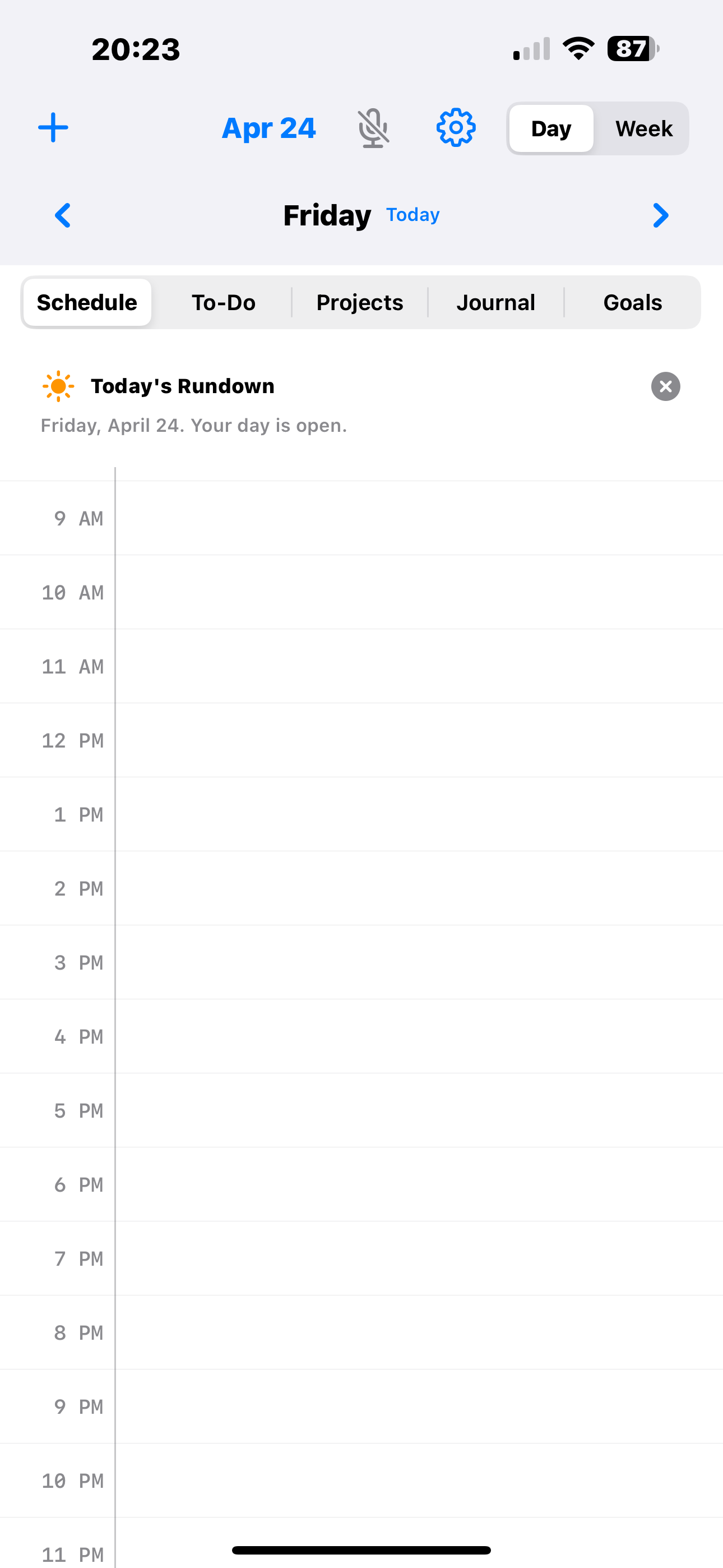
Your day as a canvas
Hour by hour, top to bottom. Calendar events drop in at the right times. Tap an empty hour to create; tap an event to edit.
Why I built this

Hi, I'm Adam. I've read every productivity book on the shelf — Covey, Atomic Habits, Getting Things Done. I've tried every planner — Todoist, Motion, Notion, Sunsama, Things. None of them stuck. I'm an ADHD-pattern person: setting up the system always cost more energy than the system saved me.
A year ago I started building a planner for my wife Brooke, who's blind. Every existing planner failed her — they all treated accessibility as a checkbox, not a design constraint. I spent a few months building the thing that didn't exist. Along the way I started using it myself. For the first time, something actually stuck.
Turns out the design decisions that make a planner work for a blind person — voice-first capture, one place for everything, no setup ceremony — are the same ones that make it work for anyone drowning in too many apps.
My social media manager saw me use it and said, "I'd use that." My wife — a stay-at-home homeschool mom with a completely different kind of juggling problem than a working pro — is shaping the packing-list and lists-of-lists side of it. What I've learned: this works for anyone trying to hold too many things in their head, whether your day looks like meetings and deadlines or kids and lesson plans.
— Adam Garceau
Compared to what you're using now
| Nudge | Notion | Todoist + Calendar | Motion / Sunsama | |
|---|---|---|---|---|
| Notes + events + goals + journal in one app | ✓ | ✓ | ✗ (2 apps) | Partial |
| Voice-first entry, no typing required | ✓ | ✗ | Partial (Siri) | ✗ |
| Zero setup required to start | ✓ | Hours | Minutes | Hours (onboarding flow) |
| Works offline / data stays local | ✓ | ✗ | Partial | ✗ |
| Syncs with Google + Apple Calendar | ✓ | ✗ | ✓ | ✓ |
| Privacy: no tracking, no accounts, no data sold | ✓ | ✗ | ✗ | ✗ |
| Cost (per year, standard plan) | $228 ($19/mo founding / $29/mo standard) | $96+ (Plus) | $72 (Todoist Pro) | $228–$600+ |
What Nudge is NOT
Being straight with you so you don't waste your time.
- It's iOS 17+ only. iPhone and iPad. No Android. No web. No Windows.
- I'm a solo founder. Small and early. I'll reply to your emails personally. That's a feature and a constraint — if you want enterprise support, this isn't it.
- AI features are optional and paid. You bring your own Claude or ElevenLabs API key for the voice assistant. Core planner works without AI and always will.
- No team or collaboration yet. Nudge is single-user. iCloud sync across your own devices, but no shared workspaces.
- Won't replace Notion for a company wiki. If you need multi-page docs with databases for a 15-person team, use Notion. Nudge is for personal planning.
- No algorithm rescheduling. Nudge doesn't move your events around without asking. You plan, it holds.
Who's using it
I'm in beta. Founding members are shaping it as I ship. I'll put real testimonials here when I've earned them — not before.
For now: the people closest to me use it. My wife — stay-at-home, homeschooling our kids — is actively shaping the list-heavy, home-side use cases. My social media manager asked for it for her working-pro juggling. Three friends with ADHD-pattern brains wanted in. That's the entire cohort right now. You'd be part of the next ten.
Privacy
No account. No tracking. No analytics. Your notes, events, goals, and journal live on your device and (if you turn it on) your own iCloud. I don't operate a server, so I don't have your data — I literally can't see it.
If you enable the optional AI assistant, your transcripts go to the provider you choose (Claude / ElevenLabs / Google) using YOUR API key. They never pass through me.
Join the beta
Free through the beta. Founding members lock in at $19/month for life. Standard rate after beta: $29/month.
No free-trial traps. No "contact sales." No hidden tiers. Cancel anytime; your data is yours to export.
iOS 17+ required. AirPods Pro recommended for voice + spatial audio.
FAQ
Do I have to use voice for it to be useful?
No. Dictation is there when you want it, typing works for when you don't. Most people I've watched use Nudge alternate: voice in the car, typing at the desk.
Does it sync with Google Calendar?
Yes — bidirectionally. If Google Calendar is set up on your iPhone, Nudge reads/writes your events there. Same for Apple Calendar, Outlook, and anything else you've added to your iOS Settings → Calendar.
What if I want to switch back to Todoist / Notion / whatever I was using?
Your data is yours. Export anytime. No lock-in. No "pause" tricks. If Nudge doesn't work for you, delete it and move on — no hard feelings.
Is there an Android version planned?
No. I'm one person. Nudge is native Swift on iPhone and iPad. Going cross-platform would mean shipping both worse — so I'm not.
Do I need to pay for AI to get the basic features?
No. Notes, events, goals, journal, calendar sync — all work without any AI. The voice assistant (natural-language commands like "move lunch to 12:30") is an optional paid add-on using your own API key.
Can my team use it together?
Not yet. Nudge is single-user. iCloud sync across your own devices (iPhone + iPad) but no shared workspaces. That's a v2 question; for now it's a personal planner.
How is this different from Tiimo / Structured / other ADHD apps?
Those are daily time-blockers. Nudge is a whole-life planner — notes + goals + journal + events, not just "here's how to slice today into 30-minute chunks." I've used them; Nudge is what's left when you stop needing to visualize your day as a calendar grid.
What happens when I submit this form?
Your name + email lands in my CRM, tagged as a founding-member candidate. I email you personally within 48 hours. If we're a fit, I send a TestFlight invite. No drip sequence, no marketing spam — I hate that stuff too.